Boldface
Study smart. A FLASHCARD APP FOR AVIATION.
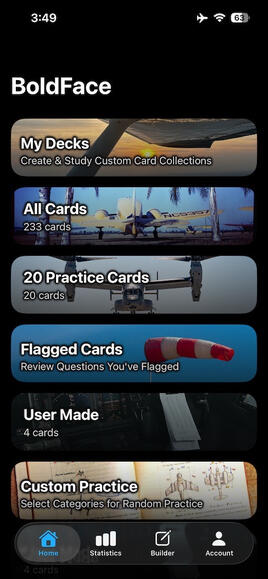
Organize your way
Separate cards by category, place them into decks, flag ones for continuous review, and set up custom study sessions.
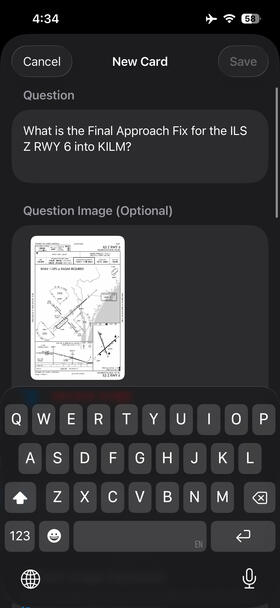
Build Custom Cards
Create custom cards, add an image to the question side, the answer side, or both, include references, and add them to decks and categories.
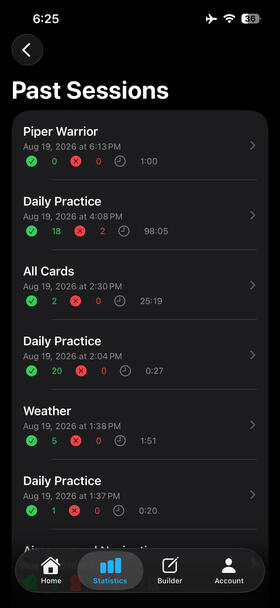
review past sessions
BoldFace keeps track of your study sessions, missed cards, and category performance so you can see exactly what areas need additional study time.
Developed by a pilot who wanted more out of a study app. You can download by searching BoldFace on the App Store or clicking below. Available on iPhone and of course, iPad. Please contact us at [email protected] or by clicking the button! Privacy policy below!
Privacy Policy for BoldFace*Last Updated: September 02, 2026Introduction
BoldFace ("we," "our," or "the app") is committed to protecting your privacy. This Privacy Policy explains how we handle your information when you use our flashcard application.Information We Collect
User-Generated Content
BoldFace allows you to create and manage flashcards. The information you provide includes:
- Flashcard Content: Questions, answers, categories, and references you create
- Custom Decks: Organizational collections of flashcards you create
- Study Progress: Your study sessions and learning progress
- Photos: Images you choose to add to your flashcards (both question and answer sides)
- Preferences: App settings and card mute preferences
- Shared Decks: Decks you choose to export and share with othersAutomatically Collected Information
We do not collect any analytics, tracking data, or personal information beyond what you explicitly create within the app.How We Use Your Information
Your data is used solely to provide the flashcard study functionality:
- Display your flashcards during study sessions
- Sync your content across your devices via iCloud
- Store your study preferences and progress
- Display photos you've added to flashcards
- Export decks when you choose to share them with othersData Storage and Syncing
Local Storage
All data is stored locally on your device using iOS standard storage mechanisms. This includes:
- Flashcard content in local files
- Photos in the app's local storage directory
- User preferences and muted card listsiCloud Sync (Optional)
If you are signed into iCloud and have iCloud Drive enabled, BoldFace uses your personal iCloud account to sync your data across your devices. This includes:
- User-created flashcards
- Custom decks
- Photos attached to flashcards
- Study preferences
- Muted card listsImportant Details:
- iCloud sync is automatic when you're signed into iCloud
- Data synced to iCloud is stored in your private iCloud storage, not on our servers
- We do not have access to your iCloud data
- Syncing uses Apple's CloudKit framework in your private iCloud container
- Data transmission is encrypted by Apple's iCloud infrastructure
- You control your iCloud storage through your Apple ID settingsPhoto Access
When you choose to add photos to flashcards:
- You explicitly select photos using the iOS Photos Picker
- The app only accesses photos you specifically select
- Photos are stored within the app's private storage and/or your private iCloud container
- We do not access your photo library beyond the photos you select
- No photo library permission is requested unless you choose to add a photoData Sharing
We do not share, sell, or transfer your data to any third parties. Your data remains:
- On your local device, and/or
- In your personal iCloud account (if iCloud sync is enabled)User-Initiated Sharing
You have the option to export and share decks you create:
- Deck Export: You can export your custom decks as files to share with others
- Voluntary Action: Sharing only occurs when you explicitly choose to export and share a deck
- Recipient Access: Anyone you share a deck file with can import it into their copy of BoldFace
- Control: You decide what to share, when to share it, and with whom
- No Automatic Sharing: We do not automatically share your content with anyoneWhen you share a deck:
- The exported file contains the flashcard content (questions, answers, categories, references) from that deck
- Photos attached to flashcards in the deck are included in the export
- Your study progress and personal preferences are NOT included
- The recipient can view and study the flashcard content you've shared
- Once shared, you cannot control or revoke access to the exported file (it becomes a separate copy)We do not:
- Send data to external servers (beyond Apple's iCloud when sync is enabled)
- Share data with advertisers
- Use analytics services
- Track your usage
- Collect personal information
- Automatically share your content with other usersThird-Party Services
BoldFace uses only Apple's frameworks and services:- CloudKit: For optional iCloud syncing (uses your private iCloud storage)
- PhotosPicker: For selecting photos to add to flashcards (iOS system framework)
- Standard iOS frameworks: SwiftUI, Foundation, UIKitNo third-party analytics, advertising, or tracking services are used.Data Security
We take data security seriously:
- All data is stored using iOS standard security practices
- iCloud syncing uses Apple's encryption and security
- Photos are stored in the app's sandboxed container
- No data is transmitted to servers we controlYour Data Rights
You have complete control over your data:Access and Export
- All your data is accessible within the app
- You can view all flashcards, decks, and photos you've created
- You can export any deck to share with others or keep as a backupDeletion
- You can delete individual flashcards, photos, or entire decks
- Deleting the app removes all local data
- To remove iCloud data, delete the app from all devices and allow iCloud to clear the data, or manage it through your iCloud storage settings
- Note: Exported deck files you've shared with others remain with those recipients even after you delete your copySharing Control
- You choose what decks to export and share
- You control when and with whom you share
- No automatic or mandatory sharing of your contentiCloud Control
- You can disable iCloud sync by signing out of iCloud or disabling iCloud Drive for the app in iOS Settings
- You can manage iCloud storage through Settings > [Your Name] > iCloud > Manage StorageChildren's Privacy
BoldFace does not collect personal information from children. The app can be used by anyone to study flashcards. Parents and guardians should supervise children's use of the app.Data Retention
- Local Data: Retained until you delete flashcards/decks or uninstall the app
- iCloud Data: Retained in your iCloud account until you delete it or remove the app from all devices
- Photos: Stored locally and/or in iCloud until you remove them from flashcards or delete the cardsChanges to Privacy Policy
We may update this Privacy Policy occasionally. Changes will be reflected with a new "Last Updated" date. Continued use of the app after changes constitutes acceptance of the updated policy.Compliance
This privacy policy complies with:
- Apple's App Store Review Guidelines
- iOS data handling best practices
- General privacy principlesContact
If you have questions about this Privacy Policy or how BoldFace handles your data, please contact us at: [email protected]